
Tools
The Tools menu (the wrench icon in the title bar) groups utilities for adjusting your media and subtitles.
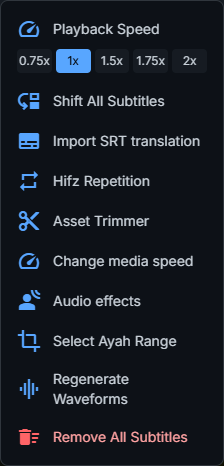
Shift All Subtitles
Move every subtitle forward or backward by a chosen amount. Optionally, shift only the subtitles starting at or after a given time, leaving the earlier ones in place.
Import SRT translation
Import a .srt file as a translation. The cues are matched to your subtitles by
timecode and added as a new translation edition.
Hifz Repetition
Turn your existing subtitles into a memorization (Hifz) track by repeating verses and generating the matching audio. You can choose:
- Standard repetition — repeat each verse a set number of times.
- Linked — practise overlapping groups such as V1, V1+V2, V2, V2+V3, with a configurable group size.
Repetition counts, pauses between repeats, and full passes are configurable.
Asset Trimmer
Trim an audio or video asset to a time range. The trimmed copy is added to the project without modifying the original.
Change media speed
Slow down or speed up an audio or video clip, from 3× slower to 3× faster. A new file is added to the project and used by the selected clip. For an audio clip covering most of the project, you can also choose to adapt the subtitle timings.
Audio effects
Apply carefully tuned FFmpeg effects to a recitation clip:
- Denoise — reduce steady background noise.
- Voice clarity — remove low rumble and enhance articulation.
- Light echo — a short, subtle repeat.
- Light reverb — a soft sense of space.
Tip: run AI Segmentation before applying audio effects — echo, reverb, and other processing can reduce detection accuracy.
Select Ayah Range
Keep only a selected range of Quran ayahs — the audio, video, and timeline are cropped to that range, and that range becomes the new timeline starting at zero. The source media files are kept intact; use an export range instead if you only want to render an excerpt without cropping the project.
Regenerate Waveforms
Clear the waveform cache and regenerate the audio waveforms shown on the timeline.
Remove All Subtitles
Remove all clips from the subtitle track after confirmation. This does not delete the project’s source audio or video files.